“We need a new website.”
It’s a sentence I hear often on a first call. Sometimes it’s true. Sometimes it’s not, and the owner doesn’t need a new website at all. They simply need a redesign, and the difference between the two can be thousands of dollars or months of disruption.
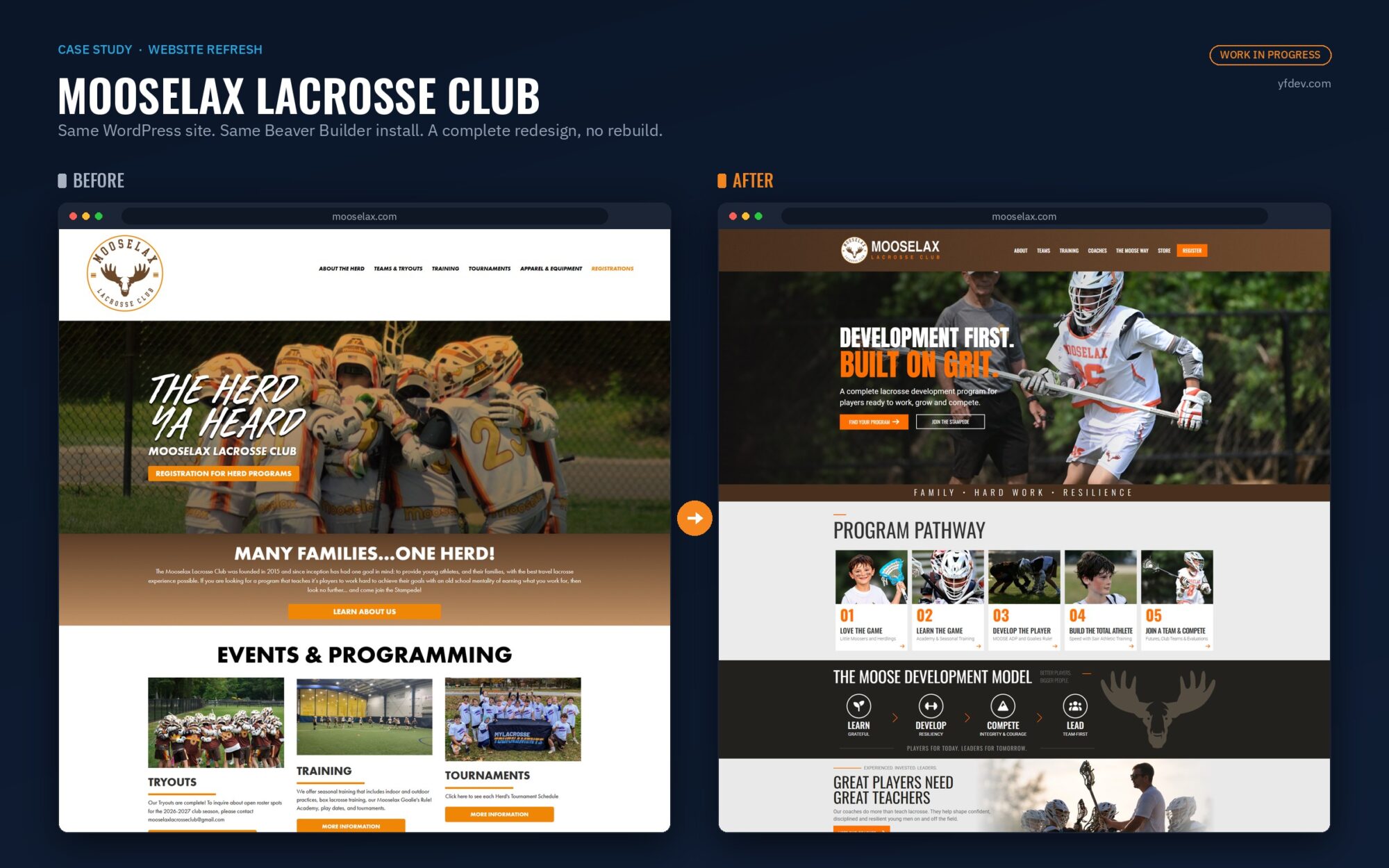
Late this summer, a youth sports team on Long Island found me through a Google search. Mooselax Lacrosse Club had a site that looked dated, a menu that no longer matched their programs, and a mockup of what they wanted instead. They wanted a new website.
Once I logged in and looked around, the answer was that there were other options available that didn’t require a full website rebuild. Not because the site was fine. It wasn’t. But because everything wrong with it was sitting on top of a foundation that was fully functional and worked.
Every Website Has Three Layers
Every website is made of three layers: the foundation, the structure and the surface. They wear out at different rates, and they cost very different amounts to replace.
| Layer | What’s In It |
|---|---|
| Foundation | Platform, hosting, domain, and anything plugged in: booking, payments, registration, forms. Plus every page address Google has already indexed. Noticed by: Google, your staff, and anyone trying to pay you |
| Structure | The menu, which pages exist, and the path from landing on the site to contacting you. Noticed by: Visitors looking for something specific |
| Surface | Fonts, colors, photos, spacing and layout. Noticed by: Everyone, immediately |
A redesign replaces the surface and the structure, and keeps the foundation. A rebuild tears out all three. It’s the difference between remodeling a dated kitchen and knocking down the whole house because of it. If the foundation works, a rebuild means paying for it twice.
The surface and the structure are also the two layers visitors judge you on, and they judge fast. In a Stanford study of 2,684 people evaluating real websites, the most common reason people gave for trusting (or not trusting) a site was its visual design, at 46.1% of comments. How the information was organized came in second at 28.5%. Researchers at Carleton University found people decide whether they like the look of a page in about 50 milliseconds, faster than a blink, and that first reaction mostly holds up after a longer look.
What Was Wrong With the Mooselax Site
Almost everything wrong with the Mooselax site was in the top two layers. The foundation was fine.
| Problem | Fix |
|---|---|
| Surface | |
| Program photos at three different heights in the same row | Every image cropped to the same shape |
| Photo carousel jumped every time it rotated | Every slide resized to one consistent size |
| Font changes didn’t take | Old CSS override removed from the builder’s global settings |
| Structure | |
| Menu didn’t match the programs the club actually runs | Menu updated, with a new Find Your Program page |
| No clear path for a parent trying to figure out where their child belongs | Five-step Program Pathway, from a first clinic to club team play |
| No privacy policy, terms of use, refund policy or code of conduct | Four policy pages added |
| Foundation | |
| Nothing. WordPress, Beaver Builder, LeagueApps registration and managed hosting all worked. | Kept as is |

The fonts were my favorite. Every time a font was changed in the page builder, nothing happened. At some point a few lines of custom CSS had been added to the builder’s global settings, and they were quietly overriding the typography on every page of the site. Found it. Deleted it. Felt great.
The carousel was a bigger problem than it looked, because a page that moves around on its own is something Google measures. The metric is called Cumulative Layout Shift (CLS), and it’s one of Google’s three Core Web Vitals. If content moves within half a second of a tap or a click, Google lets it slide. A carousel resizing itself on a timer doesn’t get that pass. Google’s target is a CLS score of 0.1 or less, and its advice is to reserve the space for every image up front so nothing jumps when it loads.
Normally I benchmark a site before any performance work. This came in as a design and content job, not a speed job, so I don’t have the before numbers. But a carousel shoving the whole page around every few seconds? Safe to say Google wasn’t a fan.
The fix for how it looked and the fix for how Google measures it were the same fix: give every image the same shape.
What a Rebuild Would Have Put at Risk
A rebuild would have put four things at risk, and none of them needed to be touched.
- The registration system. Youth sports is a serious family expense. The Aspen Institute’s Project Play survey found the average U.S. family spent over $1,000 on a child’s primary sport in 2024, up 46% since 2019. For a club, the registration link is where that money moves. Rebuilding or rewiring it in the middle of a season makes the most important link on the site the one most likely to break.
- Search visibility. Rebuilds tend to change page addresses. Google’s own documentation on site moves says a medium-sized site can take “a few weeks or more” before Google starts showing the new URLs, and to expect ranking fluctuations while it recrawls and reindexes. A redesign on the same platform avoids most of that.
- The person who edits it. The club already knew their page builder. A rebuild on a new platform means learning a new editor, or calling a developer every time a practice schedule changes.
- The budget. Every hour spent rebuilding a foundation that already works is an hour that doesn’t go into the parts families actually see.
What We Did Instead
We redesigned the site in place, on a staging copy, and pushed each piece live when it was ready.
- New global header and footer
- New homepage built from the club’s own mockup
- Five-step Program Pathway
- Eight new content pages
- Four policy pages
- News section the club posts to themselves
- Consistent image sizing across the site
Same platform, same registration system, and everything built with Beaver Builder’s own modules and LeagueApps integrations, so the club can keep editing their own site without calling me for every change.


Do You Need a New Website? Six Questions
Run your site through these before you ask anyone for a quote. The first four check the foundation. The last two tell you what kind of work you’re actually looking at.
- Is the platform still supported and updated? WordPress runs 40.2% of all websites, so being on WordPress is rarely the problem. An abandoned theme, an outdated PHP version, or a platform whose company stopped supporting it is.
- Do you own it? You should control the domain, the hosting account and an administrator login. If you can’t take your site with you when you leave, that’s a foundation problem (more on that in what the site builders don’t tell you).
- Is it clean? No malware, no browser security warnings, no error messages on the page.
- What’s plugged into it? Booking, registration, payments, a store, forms that feed your email or CRM. A rebuild has to reconnect and retest every one of them.
- Does it already get found? Check Google Search Console for the pages that earn clicks. Whatever you do next, keep those page addresses.
- Is your complaint about how it looks, or where things are? A redesign fixes both. If the complaint is that it can’t do something your platform can’t support, that’s a foundation question.
If the first four come back clean, you probably need a redesign, not a new website. If you can’t answer them, find that out first. It shouldn’t cost you anything to learn.
When a Rebuild Is the Right Call
Sometimes the foundation is the problem, and then a rebuild is the right call. When Dr. Matt Chiropractic in Merrick came to me, the site had PHP errors on every page, a black homepage, malware embedded in its files, and a theme too outdated for current WordPress. A new coat of paint on that would have been paint on a cracked slab. We cleaned it, moved it to a new server and rebuilt it.
Other signs you need a rebuild:
- An abandoned theme or plugin that blocks updates
- A platform that won’t let you export your site
- Custom code nobody can maintain
- A requirement the platform can’t handle, like selling online without real ecommerce
If your real complaint is that the site “doesn’t do anything,” that’s a different problem. I wrote about that here.
Whoever tells you which one you need should look under the hood before they quote you, not after.
Common Questions
Do I need a new website or just a redesign?
Check the foundation first. If your site runs on a supported, updated platform, you control the domain and hosting, it’s free of malware and errors, and your booking or payment tools work, a redesign is usually the better call. If the foundation itself is broken, abandoned or locked to a platform you can’t leave, a rebuild is often faster and cheaper than patching.
What's the difference between a website redesign and a rebuild?
A redesign replaces what visitors see and how the site is organized: the look, the layout, the menu and the page structure. It keeps the platform, hosting, integrations and existing page addresses. A rebuild replaces everything, including the platform underneath, which means reconnecting every integration and usually changing URLs.
Will redesigning my website hurt my Google rankings?
Not if the page addresses stay the same and the content that ranks stays in place. Most ranking disruption comes from changing URLs. Google’s documentation on site moves says it can take a few weeks or more for a medium-sized site to settle after URLs change, with ranking fluctuations along the way.
Can I keep my booking or registration system during a redesign?
Usually, yes. That’s one of the biggest advantages of a redesign. The Mooselax redesign kept the club’s LeagueApps registration system untouched while the header, footer, homepage and a dozen pages changed around it.
How do I know if my website platform is outdated?
Log in and look for pending updates to the platform, theme and plugins, and ask your host what PHP version the site runs. If updates have been skipped for years, the theme’s developer has stopped releasing updates, or the platform company has ended support, the foundation needs attention before any design work does.
Need Help?
Not sure which one your site needs? Send me the URL and I’ll take a look at all three layers. I’ll tell you whether I’d redesign it, rebuild it, or just fix a few things, and why. Reach out anytime.
“Don’t pay twice for the parts that already work.”
Statistics & Sources
- Visual design was the most cited credibility factor (46.1% of comments), with information structure second (28.5%), across 2,684 participants. Fogg et al., Stanford and Consumer WebWatch
- Visual appeal judgments form within about 50 milliseconds and stay consistent after longer viewing. Lindgaard et al., Behaviour & Information Technology, 2006
- A good CLS score is 0.1 or less at the 75th percentile of page loads. Shifts within 500 ms of user input are excluded. web.dev, Cumulative Layout Shift
- Include width and height on images, or reserve space with CSS aspect-ratio, to prevent layout shifts. web.dev, Optimize CLS
- Core Web Vitals align with what Google’s core ranking systems seek to reward. Google Search Central, Core Web Vitals
- Medium-sized sites can take a few weeks or more to show new URLs after a site move, with temporary ranking fluctuations. Google Search Central, Site Moves
- WordPress runs 40.2% of all websites and 58.7% of sites with a known CMS (September 2026). W3Techs
- U.S. families spent an average of $1,016 on a child’s primary sport in 2024, up 46% since 2019 (1,848 parents surveyed). Aspen Institute Project Play
About Yellowfin Development
Yellowfin Development is a Long Island web design and digital marketing company where every project is handled directly by the owner – design, development, hosting, SEO, and support. We specialize in WordPress, WooCommerce, local SEO, and managed hosting – with a straightforward approach and no long-term contracts.